Which OS Maps Do You Need for a Planning Application?
28 May 2026
A practical guide for architects, designers and planning consultants
Most OS maps for planning applications in England and Wales need two map-based drawings: a location plan and a block plan. Simple enough in theory. In practice, this is one of those small admin jobs that can still cause avoidable delays.
Wrong scale. Not enough surrounding context. A red line that misses the access. A plan exported as a PDF at the right size on screen, but the wrong size on paper. These are not dramatic mistakes, but they can stop an application from being validated.
For architects and planning consultants, getting the mapping right at the start saves time later. The drawings do not need to be complicated. Still, they do need to be based on the correct Ordnance Survey data, shown at the right scale, and presented clearly enough for the local planning authority to understand exactly where the site is and what land the application relates to.
This article explains which OS maps are normally required for planning applications, what each is used for, and the common mistakes to avoid.
Why Ordnance Survey maps are used for planning applications
Planning applications need accurate site plans because the local planning authority has to identify the application land, understand the surrounding context, and assess the proposal against the site as it actually sits on the ground.
That is why planning drawings are usually based on Ordnance Survey mapping rather than screenshots, satellite imagery, estate agent plans or hand-marked sketches.
OS mapping gives everyone the same reference point. The applicant, architect, planning officer, neighbours and consultees can all look at the same base plan and understand the site in relation to roads, buildings, boundaries and nearby land uses.
It also matters legally. When planning permission is granted, it applies to the land shown within the application boundary. The red line on the plan is not just decoration. It defines the planning unit for that application. If the base map is poor, out of scale or unclear, the decision can become harder to interpret and easier to challenge.
The two main OS maps you normally need
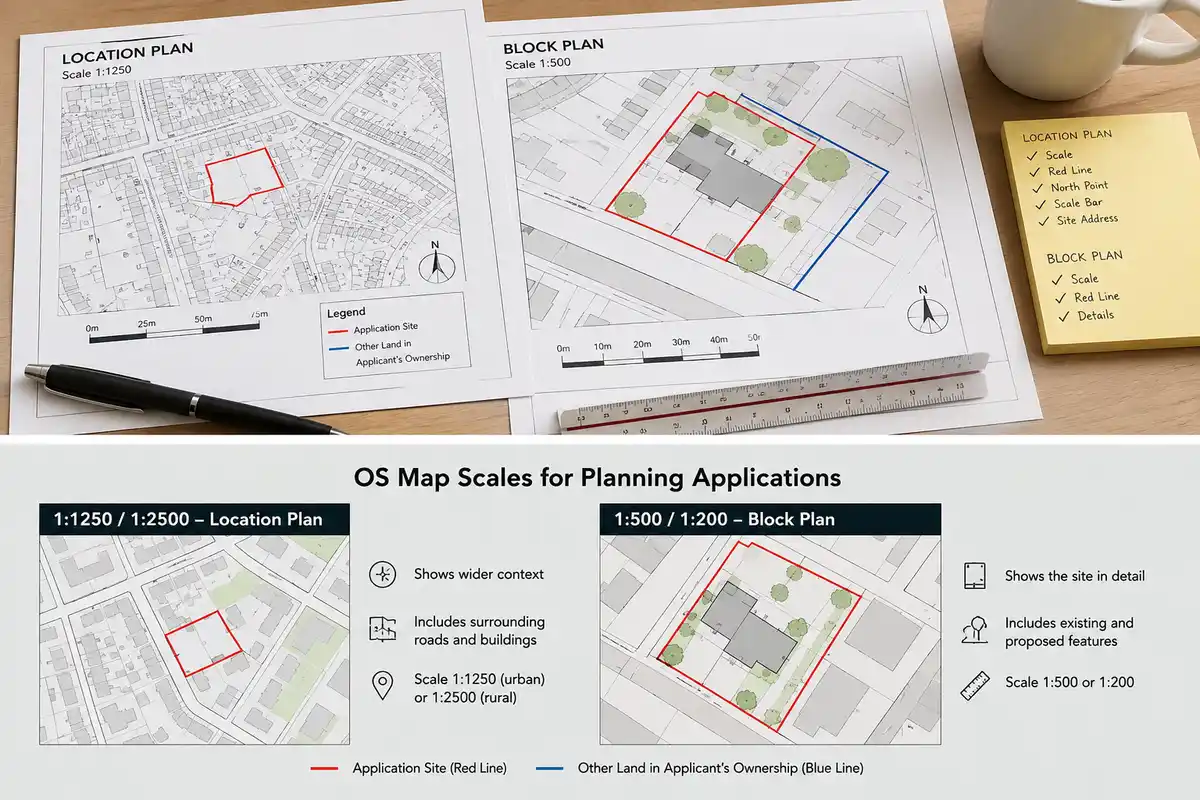
Most applications need two core drawings:
- a location plan
- a block plan, sometimes called a site plan
They are related, but they do different jobs.
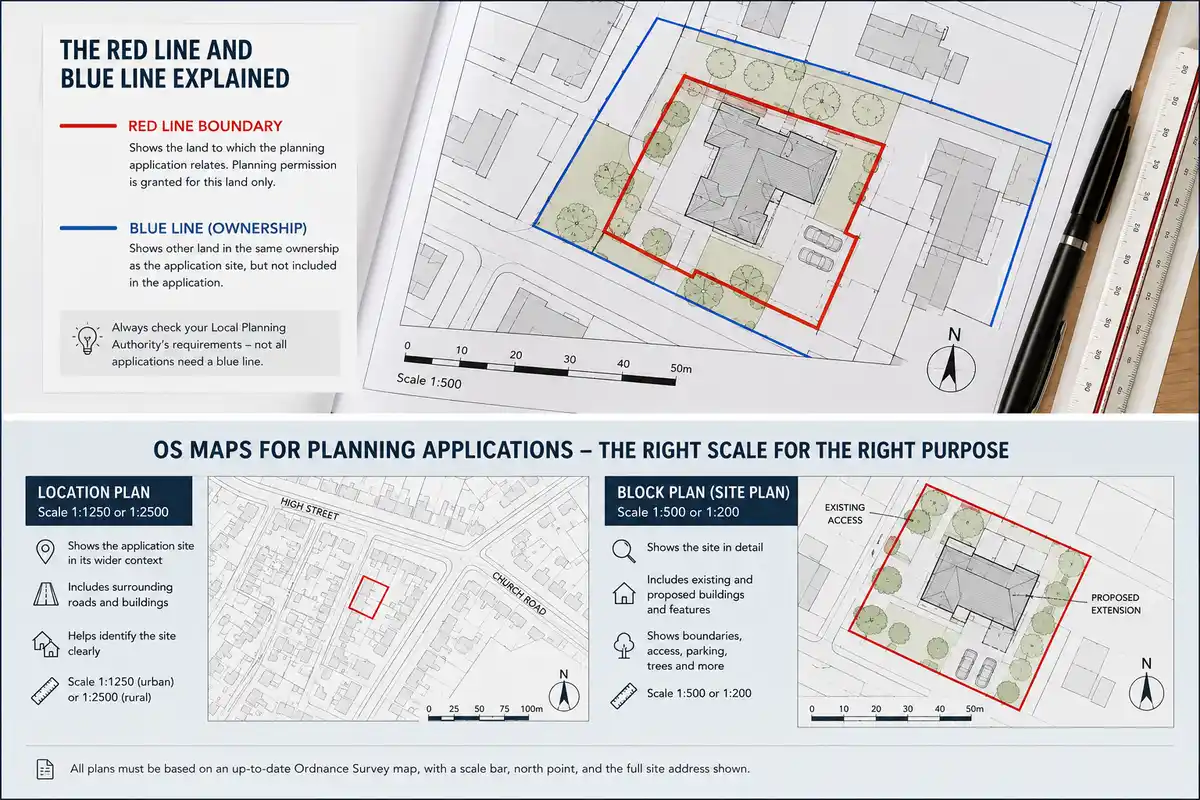
The location plan shows where the site is. It places the application site in its wider setting, showing nearby roads, surrounding buildings and enough context for the site to be identified clearly.
The block plan shows the site in more detail. It usually includes the existing and proposed buildings, boundaries, access points, parking areas, trees, hardstanding, garden space and other features relevant to the proposal.
For a simple householder application, these two drawings may be enough alongside the proposed elevations and floor plans. For larger or more complex schemes, they sit as part of a bigger drawing package.
Location plan: what it needs to show
The location plan is normally prepared at 1:1250 in urban areas or 1:2500 in rural areas.
Its job is not to show every design detail. Its job is to make the site easy to find and understand. A good location plan usually includes:
- The application site is outlined in red
- surrounding roads and buildings
- enough neighbouring land to show the site in context
- at least two named roads, where possible
- a north point
- a scale bar
- the correct drawing scale
- the full site address
For most urban projects, the location plan should show the site and the surrounding street pattern. If it is cropped too tightly, the planning officer may not be able to identify the site properly. This is especially common on rear extensions, infill plots, backland sites and properties accessed from lanes or private roads.
A little extra context is usually a good thing. Too little context can cause problems.
Block plan: what it needs to show
The block plan is more detailed. It is commonly prepared at 1:500 or 1:200, depending on the site and the type of application.
This drawing usually shows the application site, the existing building, the proposed works and the immediate surrounding features. For a domestic extension, that might include the house, garden, boundary lines, neighbouring properties, access, trees and any proposed hardstanding.
For larger schemes, the block plan may also need to show parking layouts, refuse storage, cycle storage, landscaping, visibility splays, access arrangements and relationship to neighbouring buildings.
The block plan should be based on accurate OS mapping, but it will normally include architectural information overlaid on top. That is where the architect’s proposed design work starts to sit properly within the mapped site context.
Understanding the scales
Scale causes more confusion than it should.
A 1:500 plan is more detailed than a 1:1250 plan. The number is smaller, but the drawing scale is larger. At 1:500, one millimetre on the drawing represents 500 millimetres on the ground. At 1:1250, one millimetre represents 1.25 metres.
For planning applications, the usual convention is:
| Drawing type | Common scale |
| Location plan | 1:1250 or 1:2500 |
| Block plan/site plan | 1:500 or 1:200 |
The exact requirement can vary slightly by local planning authority, so it is always worth checking the relevant validation checklist before submission.
One of the easiest mistakes is exporting the plan at the correct scale but accidentally allowing the PDF viewer or printer to “fit to page”. That can shrink or enlarge the drawing, meaning the scale label is no longer true. Always check the final PDF.
The red line boundary
The red line boundary shows the land included in the planning application.
This sounds simple, but it is one of the most important parts of the drawing. The red line should include all land needed to carry out the proposed development. That can include the building itself, the garden or site area, the access route, visibility areas, parking, drainage works, service routes or any land physically affected by the proposal.
A common error is drawing the red line tightly around the building or extension only. That may not be enough. If the proposal relies on access across a driveway, or works to a garden area, or changes to parking, that land may need to sit inside the red line, too.
The opposite problem is also possible. If the red line includes land outside the applicant’s ownership or control, additional ownership certificates and notices may be required. That can slow things down.
The safest approach is to think carefully about what land the permission needs to cover, not just what looks tidy on the plan.
What about the blue line?
Some applications also need a blue line.
The blue line is usually used to show other land owned by the applicant that sits close to, or adjoining, the application site, but is not part of the actual planning application.
Not every application needs one. Some local planning authorities are stricter about this than others, so it is worth checking the validation requirements. But where the applicant owns adjoining land, the blue line convention can be relevant.
The key distinction is:
- Red line: land included in the application
- Blue line: other nearby land owned by the applicant
Do not use the blue line as a substitute for a properly considered red line boundary.
Which OS data is normally used?
For professional planning maps, the usual base is OS MasterMap Topography Layer.
This is Ordnance Survey’s detailed, large-scale mapping dataset. It shows buildings, roads, paths, boundaries, water features, land parcels and other physical features as mapped topographic data. It is the mapping product most commonly used by planning map suppliers and architectural practices preparing location and block plans.
For wider context drawings, some other OS products may be useful, but they are not normally the correct base for the statutory location plan or block plan.
Free or open mapping products can be useful for early research, but they should not be treated as a like-for-like replacement for licensed OS planning maps. The issue is not just visual quality. Planning drawings need to be accurate, scalable and defensible.
For a formal application, use proper OS-derived mapping.
PDF, DWG or DXF?
The format depends on what you need to do with the map.
For a straightforward planning submission, a correctly scaled PDF may be enough. This is particularly true for homeowners, small builders or simple householder applications where the main requirement is to submit a compliant location plan and block plan.
For architects, CAD formats are often more useful. A DWG or DXF file can be imported into AutoCAD, Revit or other design software and used as the base for drawings. That gives you more control over layers, linework, title blocks, proposed layouts and drawing exports.
In practice:
- PDF if you need a ready-to-submit planning map
- DWG if you want to work with the mapping in AutoCAD or Revit
- DXF if you need broader software compatibility
Many practices use both. They order CAD data for design work, then export the final planning drawings as PDFs.
Common mistakes that delay validation
Most mapping-related validation issues are avoidable. The same problems come up again and again:
- the wrong scale has been used
- the red line does not include the full application site
- the plan is cropped too tightly
- there is no scale bar
- there is no north point
- the site address is missing or unclear
- the PDF has been resized during export
- the map is based on non-OS imagery
- the block plan does not show enough site detail
- the blue line is missing where the LPA expects it
None of these are difficult to fix, but they are annoying if they are spotted after submission. Worse, they can stop the validation clock from starting.
A five-minute check before submitting is worth doing.
Map currency: does it matter?
Yes, but with a little common sense.
OS mapping is updated regularly, but no national mapping dataset can show every physical change instantly. Recent extensions, demolished structures, new access points or newly built neighbouring properties may not always appear straight away.
If the OS base does not show a very recent change, it does not automatically make the plan unusable. But the discrepancy should be understood. In some cases, it may be sensible to add a note to the drawing or support the application with current photographs, especially where the difference could confuse the case officer.
For sites with recent development, it is worth checking the map carefully before relying on it.
Where to get OS maps for planning applications
Architects and planning consultants can source OS maps in a few different ways.
Larger practices may have direct access to OS data through a licence or mapping platform. That can make sense where there is a high volume of projects and a team already set up to manage the data.
For smaller practices, sole practitioners and one-off projects, per-order suppliers are usually simpler. You choose the site, select the map type, download the plan or CAD file, and use it for that application.
PlanningMapsUK provides OS-based planning maps for UK planning applications, including 1:1250 location plans and 1:500 block plans. The maps can be ordered per site, without a subscription or annual data licence, which makes them practical for architects who need compliant mapping on a project-by-project basis.
Before ordering, check:
- the site address or postcode
- the local planning authority’s scale requirements
- whether you need a PDF, DWG or DXF
- how much surrounding context is required
- whether the red line and blue line need to be drawn
- whether the plan is for a simple submission or further CAD work
Getting those details right at the start avoids re-ordering later.
A simple pre-submission checklist
Before submitting your planning application, check the maps against this list:
- Is the location plan at 1:1250 or 1:2500?
- Is the block plan at 1:500 or 1:200?
- Is the site clearly outlined in red?
- Does the red line include all the land needed for the proposal?
- Is the other land in the applicant’s ownership shown in blue where required?
- Are the surrounding roads and buildings visible?
- Is there a north point?
- Is there a scale bar?
- Is the site address shown?
- Has the PDF been exported at the correct size?
- Is the plan based on proper OS mapping?
This is basic, but basic is what gets applications validated cleanly.
Final thoughts
OS maps for planning applications are not just a box-ticking exercise. They define the site, give the proposal its spatial context and form part of the approved planning record.
For architects, the best approach is to make compliant mapping part of the normal project setup process. Order the right OS base early, use the correct scale, draw the red line carefully, and check the PDF before submission.
It is a small part of the overall design process, but it has a big effect on how smoothly the application starts. A clear, accurate OS map will not guarantee planning permission, but it does help avoid the kind of validation delays that should never happen in the first place.

Comments on this guide to Which OS maps do you need for a planning application article are welcome.
Architecture
Comments / photos for the Which OS maps do you need for a planning application advice page welcome